Documentation / Downloads
Rules Documentation
TNA Rules Writup - Tilt Forums
This is a great writeup of the rules for Total Nuclear Annihilation by Tilt Forums.
Tilt Forums TNA Rules Writup
Reactor Difficulty Matrix
This document outlines the difficulty of each reactor for each difficulty level.
Download Reactor Difficulty Matrix
Jackpot Value Lookup Table
This document shows the jackpot values depending on number of balls in play, current reactor, and number of times multiball has been started on the current reactor.
View the Jackpot Value Lookup Table
Technical Documentation
User Manuals
The user manual below was created by Chris from Kingpin Games for the original run TNA machines.
Download the Original Run User Manual
The user manual below was created by Namyzzo for the TNA CE machines.
Download the CE User Manual
Note: The 2 user manuals are just about the same as the original run and CE versions of the game were almost identical, with a few upgraded components on teh CE version.
Rubber Ring List
This document lists all the rubber rings used in the game.
Download Rubber Ring List
PD-LED Board Diagrams
This document lists all the PD-LED boards used in the game with connection information.
Download PD-LED Board Diagrams
Download TNA LED Number Map
Replacement Parts
Pinball Life TNA Game Specific Parts
Spooky Pinball TNA Game Specific Parts
Troubleshooting
LED and Opto Reliability - IDC Connector Replacement
If you're experiencing issues with LED or opto reliability as your TNA ages, the IDC (Insulation-Displacement Contact) connectors may be the culprit. Learn how to replace them with more reliable Trifurcon Crimp and Stuff connectors.
TNA LED and Opto Reliability Hack: Ditching IDC for Crimp-and-Stuff
LEDs Stuck on White Color
If a group of LEDs on your game is stuck on white, it means the PD-LED board driving that group is not receiving any serial data from the computer.
The good news is that the board is receiving power, the issue is with the data connection. To solve this, flip up the playfield and identify which LEDs are stuck. Once you've identified them, pick one and follow the LED wire back to the associated PD-LED board. This is the green board that controls that group of LEDs. Next, look for a gray serial cable, which is a 3-pin 0.100" pitch cable with a white connector on the end. Ensure this cable is plugged in all the way and seated properly. You should also follow that wire back to the previous PD-LED board and make sure it is seated properly there as well.
I recommend also applying a drop of electrically-safe RTV silicone to the connector to keep it in place. Do not use RTV that smells like vinegar.
After securing these cables, a game reboot may be necessary to resync everything.
CMOS Battery Replacement
Amazon Link for Replacement Battery
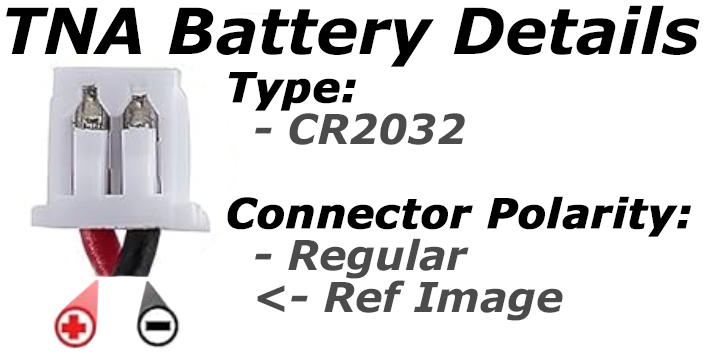
When replacing the CMOS battery, make sure the new battery has the same polarity on the wire harness connector.
This is very important as it could break your machine if you reverse the polarity of the battery. Please see the image below:
Instruction / Price Cards
TNA Logo Card
TNA Instruction Card
TNA Price Card PDF
Miscellaneous Downloads
Scarlett Wallpaper 4K
Official TNA Style Guide by Matt Andrews
